A property claim can generate several documents before it is ready for payment.
The initial repair estimate outlines what the scope is going to look like and roughly how much it will cost. Then there is the supplement, which kicks in when you spot additional damage or work that wasn’t originally on the radar. At the end of the process, the final invoice comes in with the complete lowdown on what was done and what you got billed for.
Each of these documents has its own unique purpose. The trouble starts when claims teams try to compare all three and figure out if that final bill matches up with what was approved in the first place. The information is usually there; the difficult part is finding and reconciling it.
Three Documents Can Tell Three Different Stories
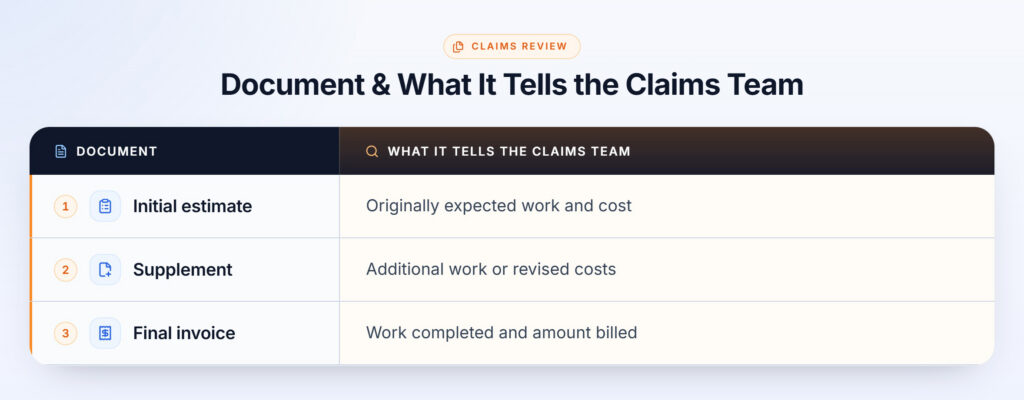
The initial estimate shows what work was expected when the claim was assessed. The supplement captures additional work or costs identified after the original estimate. The final invoice shows what was actually completed and billed.
The challenge is these documents rarely match up perfectly in terms of language, numbers or layout. A repair might be described differently in each one, quantities can change, labor costs get revised or new line items get added in the supplement or final bill. It is enough to make you wonder – is it just a case of “what is the final bill then?” No, the real question is: what changed between the original scope and the final bill?
Find Exactly What Changed Across Your Claim Documents
Upload your repair documents and let OpenParser AI extract,
compare and verify the information buried inside them.
Manual Reconciliation Turns a Simple Check Into Document Work
To answer that question, a claims adjuster might have to spend time going through several PDFs, trying to match up line items, double-checking quantities and prices, spotting any additions or removals and then making sure the final invoice adds up to what was approved.
Consider a property repair that is supposed to be simple but ends up getting complicated:
- Water-damaged drywall to sort out
- The interior needs a fresh coat of paint
- New flooring is needed
During the repair, additional drywall damage is discovered. A supplementary estimate comes in adding more materials and labor. The final invoice then consolidates the original work onto the new work and works out the actual costs.
Now the adjuster is stuck trying to figure out:
- Which items were part of the original estimate?
- Which items got added later as things came up?
- Did the approved supplementary work even make it onto the final invoice?
- Did any quantities or prices change from the approved plan?
- Are there any new items that now need a closer look to make sure everything is okay?
This is where manual reconciliation starts to become a real drag on the time available.
The Insurance Information Institute notes that most of the time, the first payment on a property claim isn’t the last and you always have to be ready for a few more to come along later as the repairs keep going.
For teams handling high claim volumes, having to keep on doing these checks can take time away from claim assessment and resolution.
The Important Details Are Often Hidden in the Differences
Comparing documents is so much more than just piling three files on top of one another. The important information tends to hide inside tables, descriptions and line items.
For example:
Initial estimate: Replace damaged flooring – 500 sq. ft.
Final invoice: Replace damaged flooring – 750 sq. ft.
That 250 sq. ft. difference may require further review.
It is the same story when:
- A new fix shows up out of the blue in the supplement.
- The quantity gets changed between versions.
- Something that was there to start with vanishes on the final invoice.
- Labor or materials costs change.
- The work billed doesn’t match up with the approved scope.
This is exactly why automated document comparison can be super helpful. McKinsey points to automated verification of repair estimates and invoices as one of the many ways digital tools can simplify the claims back-office work and speed up whole claims process.
How OpenParser AI Helps Claims Teams Compare Repair Documents
OpenParser AI is built for document-heavy workflows where important information needs to be extracted, compared and verified. For a property claims workflow, its document intelligence capabilities can help teams work across multiple repair documents without being held back by endless hours of manual searching through files.
➤ Compare Documents and Surface Changes
OpenParser AI’s document comparison agent can compare two versions of a document and show you exactly what has changed. No more trawling through both the original and the revised version trying to figure out what is different; OpenParser AI does that work for you and presents it in a clear, organized summary.
➤ Extract Structured Information From Documents
OpenParser AI can extract information inside things like PDFs and turn it into something much more useful – structured data that teams can integrate into their workflow. It supports all sorts of documents including PDF, DOCX, XLSX, PPTX, CSV and a bunch of others.
➤ Ask Questions Across the Claim Documents
A claims professional can ask questions in plain language instead of searching through individual files. For example: “Which repair items were added after the initial estimate?” or “Which line items changed between the estimate and final invoice?” OpenParser AI can return answers grounded in the connected documents.
➤ Verify Every Answer Against the Source
For claims work, having an answer without supporting evidence isn’t enough. OpenParser AI will show where the answer comes from though, linking the answer back to the original document with a citation. So, the claims professionals can quickly check if the information is correct before taking any action on it.
➤ Keep Human Review in the Loop
OpenParser AI can spot changes and organize information, but the claims professional remains responsible for evaluating the claim and making the final decision. This makes OpenParser AI a useful decision-support layer rather than a replacement for claims expertise.
Find Exactly What Changed Across Your Claim Documents
Upload your repair documents and let OpenParser AI extract,
compare and verify the information buried inside them.
Frequently Asked Questions
1. Why do claims teams compare repair estimates and final invoices?
The comparison helps identify changes in repair scope, quantities, costs and completed work before a claim is finalized.
2. What is a supplement in an insurance repair claim?
A supplement updates the original repair estimate when additional work or costs are identified after the initial estimate.
3. Can OpenParser AI compare multiple claim documents?
Yes. OpenParser AI includes document comparison capabilities designed to identify changes between document versions and present them in a structured format.
4. Can claims teams verify OpenParser AI’s answers?
Yes. OpenParser AI provides citations that point users back to the source material so they can verify the information before acting on it.
5. Does OpenParser AI replace claims adjusters? No. It supports document extraction, comparison and information retrieval. The claims professional remains responsible for evaluating the claim and making the final decision.