What If Your MSA Could Answer Its Own Questions?
Picture this: it’s 6:45 PM on a Thursday, and a first-year associate is staring at a 150-page Master Services Agreement, trying to answer one question a partner asked twenty minutes ago. “What are our termination rights again?” The associate knows the answer is in there somewhere. Section 9, maybe? Or was it buried in the schedules? Forty-five minutes later, they find it, cite the wrong page the first time, double-check, and finally send a reply. The partner never sees those forty-five minutes. The client definitely doesn’t want to pay for them.
This scene plays out thousands of times a day across law firms, and it’s exactly the kind of problem we built OpenParser to solve.
Before we get into the legal side of things, it’s worth saying this upfront: OpenParser wasn’t built as a one-industry tool. It works just as hard for real estate teams chasing lease terms, finance and banking teams reconciling disclosures, insurance companies tracing policy language, and manufacturers digging through compliance documentation. Anywhere there’s a mountain of documents and someone who needs one exact answer from inside them, OpenParser earns its keep. But today, we want to talk about legal, because it might be the industry where this problem is felt most personally, hour by hour, by the people billing for their time.
The Real Cost of “Let Me Check”
Here’s the thing about legal work that doesn’t show up on a law school syllabus: so much of it isn’t complex reasoning, it’s retrieval. It’s knowing a clause exists, then spending real time hunting for it.
Associates re-read contracts they’ve already read once, because memory isn’t reliable enough to bet a client relationship on. Partners either burn their own hours double-checking junior work, or write off the associate’s hours entirely. Multiply that across every MSA, NDA, and amendment sitting in a firm’s document management system, and the shape of the problem becomes clear. It’s not that lawyers are slow, it’s that their tools were never built to answer questions, only to store documents. A DMS (Document Management System) is excellent at keeping things safe and organized. It is not designed to tell you, in plain English “what Section 12.2 actually says”.
Find Exactly What Changed Across Your Claim Documents
Upload your repair documents and let OpenParser AI extract,
compare and verify the information buried inside them.
Ask the Question, Get the Clause
This is where OpenParser works differently than the search bar most legal teams are used to. Upload the agreements, or connect OpenParser directly to your existing DMS or SharePoint, and nothing about your current filing structure has to change.
The difference shows up the moment someone has a question. Instead of opening a PDF and guessing at keywords, you just ask, the same way you’d ask a colleague who’d read the whole contract that morning and remembered every word of it.
Here’s a real example, anonymized, from a Q&A run through OpenParser on an actual MSA.
Question: “What are the termination-for-convenience rights in this MSA, and what notice is required?”
OpenParser’s answer: “Either party may terminate for convenience on 60 days’ written notice (Section 12.2, p. 47). Early termination fees apply per Schedule C (p. 112).”
Read that answer again, slowly, and notice what’s actually happening. This isn’t a generic AI paraphrase of “contracts usually work like this.” It’s not a hallucinated best guess dressed up in confident language. It’s a specific answer, tied to a specific clause, on a specific page, cross-referenced against a related schedule buried sixty-five pages later in the same document. That cross-reference alone, connecting Section 12.2 to Schedule C, is the kind of detail an exhausted associate might miss on a first read, let alone remember three months later when the question comes up again.
That’s the part that matters most for legal work specifically: the citation. A tool that gives lawyers an answer without telling them exactly where that answer came from is not a tool a law firm can actually use. Every profession has its own definition of “trustworthy,” and in law, trustworthy means defensible. It means being able to point to the page. OpenParser was built around that requirement, not as an afterthought, but as the whole design principle. Every answer comes back with the clause and the page cited, so nobody has to take the tool’s word for it. You can verify it in five seconds, which, not coincidentally, is roughly how long it now takes to get the answer in the first place.
OpenParser vs. The Old Way
It’s worth laying this out side by side, because the difference isn’t just speed, it’s what you actually get back at the end.
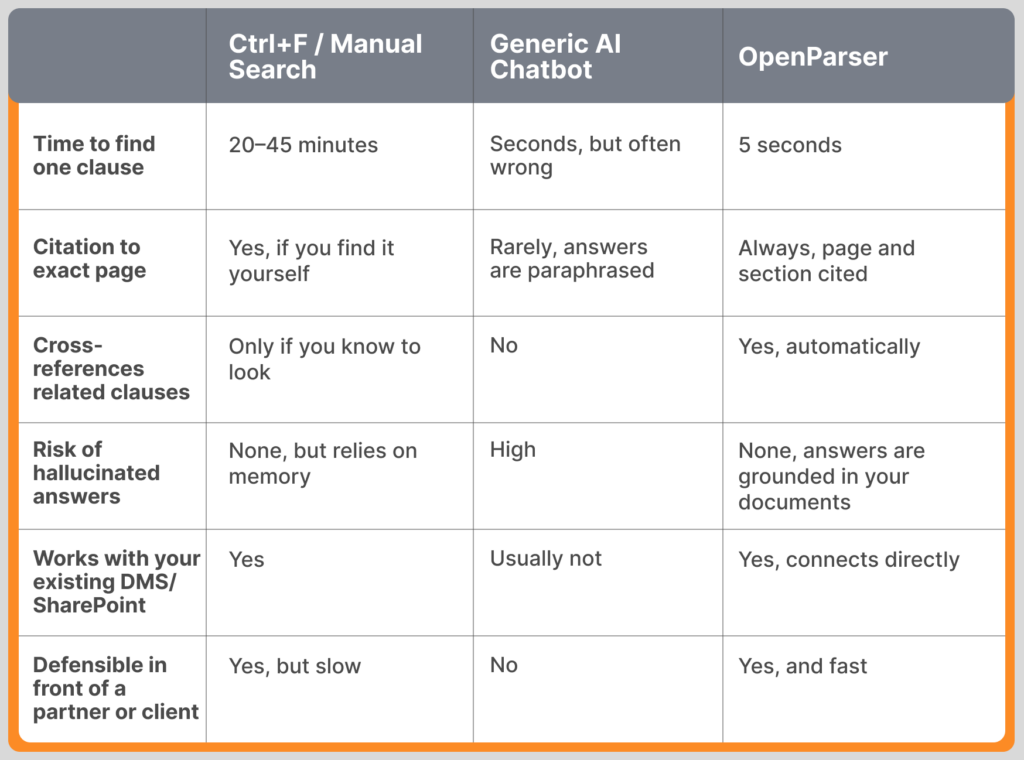
The middle column is the one worth pausing on. A lot of legal teams have already tried a general-purpose AI chatbot for this kind of work, and the appeal is obvious: it’s fast, and it sounds confident. The problem shows up later, usually when someone tries to verify the answer and can’t find where it came from. A fast answer that isn’t defensible isn’t actually useful in a legal context, it’s just a faster way to be wrong. OpenParser was built to close exactly that gap, keeping the speed of AI while keeping the discipline of “show your work” that legal teams can’t compromise on.
Five Seconds, Not Forty-Five Minutes
There’s a version of this story where the value proposition is just “it saves time,” and that’s true, but it undersells what actually changes for a legal team.
When an associate can get a cited answer in five seconds, they stop rationing their questions. They ask the follow-up instead of assuming they remember the answer. Partners stop absorbing hours they can’t bill, because research that used to take an evening now takes a coffee break. And clients get faster, more accurate answers without ever knowing there was a 150-page document standing between the question and the response.
There’s a quieter benefit too, one firms tend to notice a few months in: the knowledge stops living in any one person’s head. When the associate who “always handled that client’s contracts” moves on, the firm doesn’t lose the institutional memory of what’s actually in those agreements. The documents become the memory, searchable by anyone who needs them.
Built for the Way Law Actually Works
None of this requires a law firm to rebuild its systems. OpenParser deploys within your own environment, connects to the documents you already have, in whatever format they’re already in, and answers the way a very well-read colleague would: clearly, specifically, and with the receipts to back it up.
If you’ve ever watched an associate spend forty-five minutes finding a clause that took five seconds to explain once they found it, you already know what this is worth.
Contact us today to walk you through exactly how this works on real contracts, including live Q&A on actual MSAs, so you can see the citations for yourself instead of taking our word for it.
Find Exactly What Changed Across Your Claim Documents
Upload your repair documents and let OpenParser AI extract,
compare and verify the information buried inside them.